Andrew Flusche, Fredericksburg Lawyer

Fredericksburg Lawyer

Your lawyer for Fredericksburg, Stafford, and Spotsylvania, VA

FreshBooks Vista Sidebar Gadget
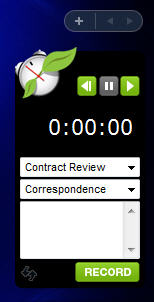
FreshBooks Vista Gadget Screenshot

Version 2 Released! - Check out the changelog below, and download version 2.

About the Gadget

I use FreshBooks for my billing. It’s a great system that I recommend for everyone.

To help keep time easier, I created this Vista Sidebar Gadget. It’s based on FreshBooks’ Time Tracking Widget for OS X. It lets you input your FreshBooks time directly from your Windows Vista Sidebar.

One of FreshBooks’ web designers, Jaco Joubert, created the beautiful skin for the gadget. Thanks Jaco!

Download the FreshBooks Vista Sidebar Gadget

If you have any questions or comments about this gadget, please post a comment below.

Changelog

Version 2 - 7-6-2008

  • Redesigned skin - thanks to Jaco from FreshBooks
  • Shorter, so less Sidebar space is required
  • Shadow displayed when you undock the gadget
  • Reset button - start the timer over
  • Edit time by clicking on the counter
  • Settings panel clarified, so you know to input only the first part of your FreshBooks address
  • Fixed a bug - click the clock icon to go to your FreshBooks page
  • Update notification - the gadget will detect when a new version is available and ask you to upgrade

Version 1 - 6-11-2008

  • Initial version
  • Basic timer without a reset button or edit functionality
  • Ugly design done by a lawyer (me)

Gadget Press

People are taking notice of the gadget. Check it out!

Taavi posted a great article on the FreshBooks API Blog.

Free consultation. Call Andrew: 540.318.5824

17 Comments

  1. Mike Robbins

    I’ve tried all of the 3rd party time tracking utilites on Freshbooks’ site. This is by far the best….. A link taking me directly to my Freshbooks login page and it would be perfect! :)

    Thank-you for this valuable tool and keep up the good work!

  2. @Mike - Try clicking on the clock icon in the upper left corner of the gadget. That should take you straight to your FreshBooks home page. :)

  3. Erica

    Awesome app for the vista sidebar! Now I have an excuse to actually use it. It’s nice to see your time as you work without having to stop and click or hover over a system tray icon. I definitely needed this since I love Freshbooks. Thanks!

  4. @Erica - I’m glad you like the gadget. Please feel free to provide any constructive criticism for the next release!

  5. Brilliant!

  6. @Denise - Thanks. :)

  7. Is there any way to add an employee select field? Otherwise it’s freaking awesome! Nice work..

  8. @Troy - I thought that each user got their own API string. If you enter the staff member’s API string in the Settings panel, the hours should be logged for that person. Is there some other functionality you are looking for?

  9. nancy

    Hi - I just signed up for Freshbooks and downloaded the sidebar gadget to track time ….it asks me to enter FreshBooks address and API token in setting menu. I’m technically challenged and I don’t know what or where to find that - can you help? thanks. Nancy

  10. Dan

    nancy: go to settings > Enable FreshBooks API and enable it. your token then will be displayed.

    Thanks for the widget Andrew… One thing though, clicking on the clock icon does take me to my fb page, but it opens it in IE, and not my default browser (firefox)…

  11. @Dan - Thanks for helping out Nancy. I’ve noted the default browser issue as well. Hopefully I can fix it in the next release.

  12. This would have been great for Windows XP…
    Any thoughts to develop something for Windows XP taskbar?

  13. @crushlabs - I don’t have any plans to take this to XP. You might post a request over in the FreshBooks forums. Who knows what might happen!

  14. Love it, love it, LOVE it! Great work, Andrew. Thank you so much.

    One thing that would make the gadget even better is the ability to have more than one project and/or task open. Sometimes work on one thing gets temporarily interrupted by work on another. It’d be nice not to have to stop the timer, record the hours, input the interruption, and reenter data and start the clock again on the original task.

    This is a mere quibble, though. Overall, this is a very effective, convenient, and mightily appreciated tool.

  15. @Francis - Thanks for the feedback! I’ve made a note of your suggestion, but I’m not sure if I can make it happen. That would take a significant change to the gadget, and it might not be something that’s very feasible to do.

  16. Mendy Elishevitz

    It worked great for a while, but recently I started getting an error “HTTP status 12019″ and the projects don’t load. Otherwise, it’s really a great app.

Post a comment